
Supercharge Your IT Team. Don't Replace Them.
Give your internal team the tools, support, and specialized expertise they need
—with clear boundaries, fast escalation, and shared visibility.
Your Team Stays in Control
Strategy, internal priorities, and business- critical decisions
Execution support, security operations, and documentation
Reporting, accountability, and continuous improvement
The Challenges You're Facing
Your team is skilled, but stretched thin. These are the operational gaps we help fill.
Backlog Growing Faster Than Capacity
Tickets pile up, projects get delayed, and your team is constantly in reactive mode with no time for strategic work.
After-Hours & Incident Coverage is Weak
Your team can't be on-call 24/7. When incidents happen outside business hours, response times suffer.
Security Tooling is Fragmented
You have endpoint protection, but no MDR. Password management is inconsistent. Security training is ad-hoc.
Documentation Lives in People's Heads
There's no formal runbook. Network diagrams are outdated. Policies exist but aren't documented or enforced.
Onboarding/Offboarding is Inconsistent
New hires wait days for access. Offboarding is manual and error-prone. No standardized process exists.
Leadership Needs Real Reporting
Executives want visibility into IT operations, security posture, and budget forecasting — not vague status updates.

See How We'll Integrate With Your Team
We'll walk you through exactly how roles are documented and how escalations work.
See How It Works in Practice
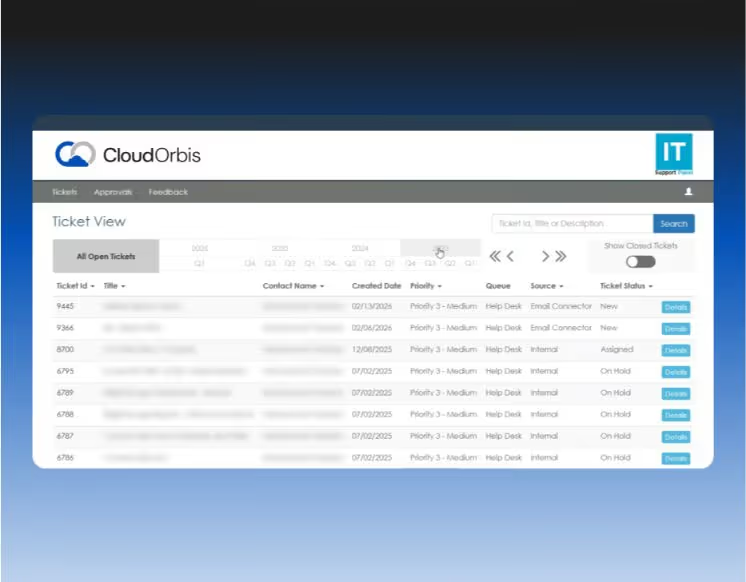
Our custom IT Button platform gives employees one-click ticket submission with screenshot capture, while managers get real-time visibility into all tickets—eliminating status meetings and email chasing.
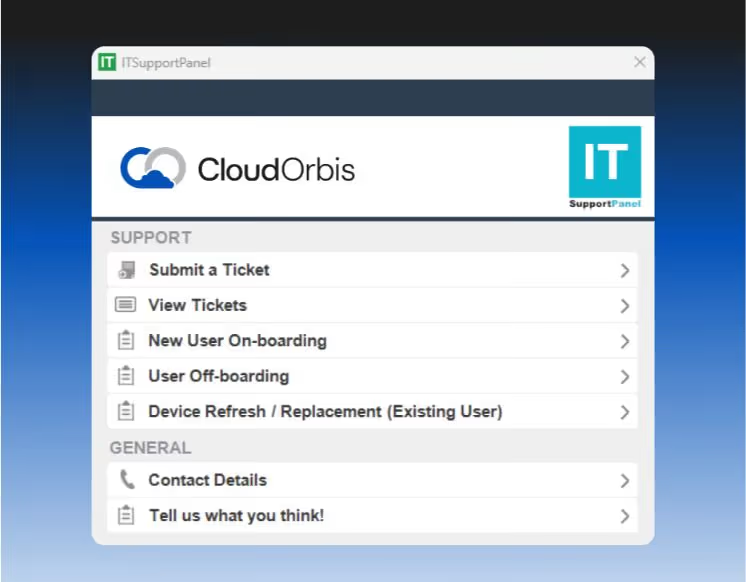
Employee Support Tool
One-click ticket creation
Screenshot capture
Chat-based support
Submit tickets on behalf of others
View ticket history

Shared Manager Dashboard
Company-wide ticket visibility
Resolution time tracking
Recurring issue identification
No more status chasing
Integrated with your team's view
Your team gets the same visibility. No duplicate systems. No information silos. Just shared accountability.
Enterprise Security Without the Enterprise Overhead
Automated threat response, password governance, and compliance training — so your team can focus on strategic work.
MDR: <5-Second Incident Response
SentinelOne EDR + Vigilance MDR with automated threat mitigation and human oversight.
24/7 threat detection
Automated mitigation in under 5 seconds
Post-incident reporting
No manual intervention required
Password Governance with ACLs
Business password manager with department-level access control and MFA integration.
Department-based vaults
TOTP code management
Centralized admin control
Vacation/offboarding continuity
Training + Phishing + Reporting
Ongoing security awareness training with monthly phishing simulations and compliance reporting.
Monthly phishing tests
Targeted training for failures
Completion rate tracking
Insurance-ready documentation
Documentation That Protects Your Business
Formal runbooks and policies that satisfy insurance requirements, pass audits, and ensure continuity—even if someone leaves.
Runbooks for Continuity
Full asset inventory with warranty tracking
Network diagrams (logical and physical)
Backup schedules and validation logs
Recovery Time Objectives (RTO)
Recovery Point Objectives (RPO)
Environment documentation
Formal IT + Security
Policies
Acceptable Use Policy
MFA & Password Policy
Device Policy
Remote/Hybrid Work Policy
Incident Response Plan
Disaster Recovery Plan
Data Governance Framework (Canadian standards)
You'll Know Exactly What's Happening Each Month
Leadership gets the visibility they need. Your team gets the operational data they need. No more vague updates.
Operational Reporting
Tickets, trends, and asset management
Tickets opened/resolved by team
Recurring issues and trends
Asset inventory and lifecycle planning
Response time metrics
Budget forecasting
Security Reporting
Training, compliance, and risk posture
Security training completion
Phishing simulation results
Patch compliance status
Risk posture overview
Insurance-ready documentation
Quarterly strategic reviews include budget forecasting, replacement planning, and technical deep dives. Your team participates directly.

Ready to Augment Your Team?
See how we integrate with your existing operations without disrupting what's working.

Why Partner with CloudOrbis?
We're not here to replace your team. We're here to make them more effective.












Common Questions
Everything you need to know before booking your call.
How do you integrate with our existing ticketing system?
We can integrate with your existing ticketing system (ServiceNow, Jira Service Management, Freshservice, etc.) or provide our IT Button platform as a parallel system. During discovery, we'll assess your current setup and recommend the best integration approach. Most clients use our IT Button for end-user tickets and keep their internal system for strategic projects and vendor management.
What access does your team get to our environment?
We follow the principle of least privilege. Your team defines access levels during onboarding based on the responsibility matrix. Typically, we get admin access to endpoint management, security tools, and infrastructure monitoring. Access to business- critical applications (ERP, CRM, line-of-business systems) stays with your team unless explicitly delegated. All access is documented, audited, and reviewed quarterly.
How do you handle after-hours incidents?
We provide 24/7 coverage for security incidents (MDR response is automated and under 5 seconds) and infrastructure issues. For after-hours end-user support, we handle Tier 1/2 tickets based on the responsibility matrix. If an incident requires your team's involvement (e.g., application-specific issue), we triage, document, and escalate according to documented protocols. Your team isn't on-call unless it's a business-critical escalation.
How are roles and responsibilities documented?
During onboarding, we create a formal responsibility matrix (see the Operating Model section above) that defines who owns what. This includes support tiers, escalation paths, device lifecycle management, security operations, documentation ownership, and reporting cadence. The matrix is reviewed quarterly and updated as your environment evolves. It's included in your runbook and accessible to both teams.
What does the escalation path look like?
Escalations follow a documented flow: User ticket → Triage (routed to internal IT or CloudOrbis based on responsibility matrix) → Resolution (by assigned team) → Handoff if needed (documented in ticket notes) → Post-incident documentation added to runbook. Escalation rules are defined during onboarding and include response time SLAs, communication protocols, and decision-making authority. No finger-pointing, just clear handoffs.
How do you keep runbooks current?
Runbooks are living documents. We update them quarterly during strategic reviews, after major infrastructure changes, and whenever new systems are deployed. Your team reviews and approves updates. Post-incident notes are added in real-time to capture lessons learned. Asset inventory is updated monthly as part of operational reporting. Network diagrams are refreshed annually or after significant changes.
Can we bring some services in-house later?
Absolutely. If your team grows and wants to take on more responsibilities, we adjust the responsibility matrix accordingly. The documentation we create (runbooks, policies, network diagrams) stays with you. We're not trying to create vendor lock-in— we're trying to make your team more effective. If you eventually outgrow co-managed support, you'll have everything you need to run IT independently.
How do you handle onboarding and offboarding?
We coordinate with your team to standardize the process. For onboarding, we handle hardware deployment, account provisioning, and access setup based on your team's specifications. For offboarding, we revoke access, wipe devices, back up files per your retention policy, and audit shared credentials. Your team approves the workflow, and we execute it consistently. This eliminates the "who's handling this?" confusion.
What if we already have endpoint protection?
We'll assess your current endpoint protection during discovery. If you have EDR but no MDR (managed detection and response), we can add our MDR layer on top. If your current solution doesn't meet our security standards (e.g., no automated threat mitigation, no 24/7 monitoring), we'll recommend transitioning to our stack. We're flexible on most tools, but security-critical components are non-negotiable for consistent protection.
How do you charge for co-managed services?
Pricing is based on the scope of responsibilities defined in the responsibility matrix. We charge per user for end-user support, security operations, and reporting. Additional services (device lifecycle management, after-hours coverage, strategic reviews) are priced based on frequency and complexity. During the consultation, we'll walk through your current environment, define the responsibility split, and provide transparent pricing with no hidden fees.
Do you work with our existing vendors?
Yes. We coordinate with your existing vendors (ISPs, software vendors, hardware suppliers, application support) as needed. If vendor escalation is required, we handle the communication and follow-up based on the responsibility matrix. We don't replace your vendor relationships—we manage them more effectively so your team doesn't have to chase down support tickets.
What makes CloudOrbis different from other co-managed providers?
Most co-managed providers are just traditional MSPs trying to upsell services. CloudOrbis is different: 1) Documented Operating Model with a formal responsibility matrix and escalation flow, 2) Security-first operations with MDR, password governance, and training, 3) Documentation-first approach with runbooks and policies your team reviews, 4) Transparent reporting with operational, security, and strategic reviews, and 5) Respect for your team—we're here to augment, not replace. We're not the cheapest, but we're the most structured and accountable option for IT teams that want to scale without losingcontrol.
Scale Your Team, Not Your Headcount
Get the enterprise tools and expert support you need to succeed. See how we integrate with your existing operations, document responsibilities, and provide the security operations and reporting your team doesn't have time for.