
Stop Managing IT. Start Growing Your Business.
Fully managed IT should eliminate friction, reduce risk, and give you executive-level visibility — not create more tickets and uncertainty. CloudOrbis delivers structured, security-first IT management designed for organizations that cannot afford downtime, compliance gaps, or reactive support.
"All-You-Can-Eat" Support is a Trap
Most MSPs promise unlimited support. Few deliver structured, governed, and secure environments.
If IT isn't documented, governed, and continuously reviewed — it's a liability.
The Cost of "Cheap" IT
Reactive ticket handling with no prevention strategy
No formal cybersecurity governance
No documented disaster recovery framework
Inconsistent onboarding and offboarding
No compliance-ready reporting
The CloudOrbis Standard
We don't guess. We follow a proven process to build a resilient IT foundation.
.avif)
Discovery
Comprehensive audit of infrastructure, security posture, governance gaps, and compliance risk
Deep Dive Assessment
Identify structural weaknesses, undocumented systems, and risk exposure
Structured Implementation
Security stack deployment, policy documentation, ACL configuration, password governance, backup validation
Proactive Management
Ongoing monitoring, quarterly reviews, disaster recovery testing, and lifecycle planning
What Fully Managed IT Actually Means at CloudOrbis
We are not a ticket shop. We are a cybersecurity-first IT governance partner.
24/7/365 Managed Detection & Response in Seconds
SentinelOne EDR + MDR monitoring
Real-time automated mitigation
Human security team oversight
Incident documentation and response tracking
Compliance-ready reporting
One-Click Ticket Creation
One-click ticket creation
Built-in screenshot capture
Real-time chat with technicians
Full ticket history access
Manager-level visibility
Custom workflows per company
Hassle-Free Onboarding & Offboarding
Pre-deployment setup before start date
Desk and hardware prepared in advance
Secure decommissioning of departing employees
Device wiping and redeployment readiness
File retention policies enforced
Password Management & Privileged Access
Department-based access control lists (ACLs)
Centralized TOTP management
Role-based credential segmentation
Governance-aligned data classification
Data Governance & Access Control Architecture
Structured data classification: Public → Internal → Confidential → Restricted
Access controls mapped to departments and roles
Foundational for compliance and cyber insurance
Cybersecurity Training & Testing
AI-driven training (3-5 minute micro-learning modules)
Simulated phishing campaigns
Compliance-ready reporting
Executive visibility dashboards
Email Protection & Security Policy Framework
Acceptable Use Policy
MFA & Password Policy
Malware & Suspicious Attachment Scanning
Remote/Hybrid Work Policy
Email Archiving & Retention Policy
Disaster Recovery Plan
SOC-2 Compliant Documentation Management
Asset inventory with warranty tracking
Backup schedules and locations
Network diagrams
Recovery time objectives (RTO)
Recovery point objectives (RPO)
Executive-Level Reporting & Reviews
Monthly operational summary
Strategic technical review (owner-level involvement)
Cybersecurity & compliance reporting
Budget forecasting and lifecycle planning
Complete Peace of Mind
Everything you need for secure, compliant, and efficient IT operations.
5-Minute Response
When you submit a ticket, our team responds within 5 minutes. For security incidents, mitigation happens in under 5 seconds.
Dedicated vCIO
Your strategic partner for IT planning, budgeting, and technology roadmaps — not just break-fix support.
Security Stack
MDR, EDR, password management, ACL-based data governance, phishing training, and policy frameworks — all included.
We Are a Cybersecurity Company First
If you peel back the layers of CloudOrbis, cybersecurity is the core.

One-Click Support: The CloudOrbis IT Button
Our custom support platform gives every employee instant access to IT help — with automatic screenshot capture, chat-based support, and full manager visibility into every ticket.
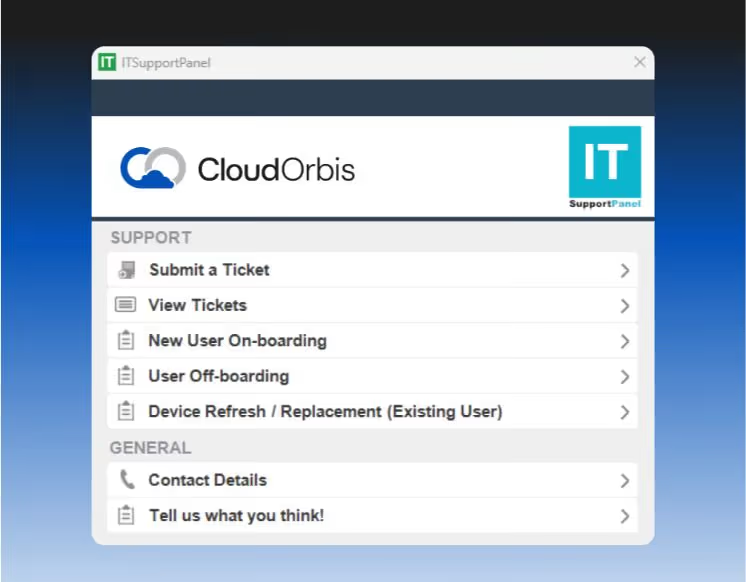
IT Button
One-click ticket creation
Built-in screenshot capture
Real-time chat with technicians
Full ticket history access

Manager Dashboard
One-click ticket creation
Built-in screenshot capture
Real-time chat with technicians
Full ticket history access
Every supported device includes our custom IT support application. Submit tickets in seconds, attach screenshots automatically, and track everything in one place. Managers get full visibility without chasing status updates.

Get IT Help in One Click.
Our proprietary support tool lives on every employee's desktop. One click submits a request with an automatic screenshot. Managers see everything. Nothing falls through the cracks.
Seamless Onboarding & Offboarding
New employees start Monday with everything ready. Departing employees are offboarded securely with zero loose ends.
Thursday/Friday
Hardware prepared before start date, desk setup complete, accounts provisioned
Monday Morning
Smooth first-day experience, all systems ready
Week 1
Training and support, IT On-Boarding walkthrough
Day of Departure
Immediate credential revocation, access disabled
Device Collection
Secure wipe and redeployment preparation
File Retention
7+ years retention policy enforced, data archived
Documentation That Protects Your Business
Formal IT policies and runbooks that satisfy insurance requirements, pass audits, and ensure business continuity.
Insurance Readiness
Cyber insurance requires documented policies. We provide formal IT policies aligned to Canadian standards that satisfy carrier requirements.
Compliance
HIPAA, SOC 2, GDPR, and other frameworks require formal policies. We deliver audit-ready documentation that passes compliance reviews.
Business Continuity
Runbooks mean you can recover from disasters. Full environment documentation with RTOs, RPOs, and recovery procedures.
No Tribal Knowledge
Everything is documented—not stuck in someone's head. Asset inventory, network diagrams, backup schedules, and warranty tracking.
You Don't Just Get Support — You Get Visibility
Three-tier reporting system for complete operational transparency.

Monthly Operational Report
Tickets opened/resolved
Recurring issues
Asset inventory
User count adjustments
Response time metrics

Strategic Technical Review
Budget forecasting
Hardware lifecycle planning
3 computers up for replacement in 2026
Technical deep dive
Owner involvement
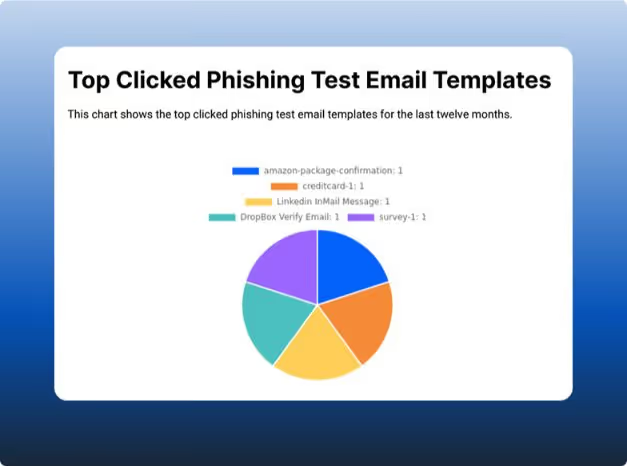
Cybersecurity Compliance Report
Training completion rates
Phishing simulation results
Patch compliance
Insurance-ready documentation
Risk posture overview
Ready to See How We're Different?
Get a personalized walkthrough of our support platform, policies, and reporting.
From Ransomware Panic to 100% Uptime
A 90-person law firm came to us after a ransomware scare with their previous MSP. They needed structured security, documented policies, and executive visibility.
The Problem
No documented disaster recovery plan
Inconsistent backup testing
No cybersecurity training
Reactive ticket handling
The Result
Zero security incidents in 18 months
Quarterly DR testing with documented RTOs
95% phishing training completion
Cyber insurance premium reduced by 22%
Why Choose CloudOrbis?
Here's how we stack up against the "other guys."

Common Questions
Everything you need to know before booking your call.
How fast do you respond to security incidents?
Security incidents are mitigated in under 5 seconds through automated MDR systems with human oversight. Ticket response time is separate — incident mitigation is immediate.
What happens during onboarding?
During onboarding, we complete a full assessment of your IT environment, identify risks and gaps, and deploy monitoring and security tools to ensure everything is protected and optimized.
Do you support compliance requirements?
Yes. We help businesses meet industry and regulatory compliance requirements by assessing your current environment, identifying gaps, and implementing the necessary security controls, policies, and documentation.
How do you handle employee onboarding and offboarding?
Onboarding: We coordinate with your HR team to ensure new employees start Monday with everything ready. Our team shows up Thursday or Friday to set up their desk, deploy their computer with all required software, configure access permissions, and provision accounts. This creates a positive first impression and supports employee retention.
Offboarding: When an employee departs, we immediately revoke access, wipe their device, back up their files according to your retention policy (typically 7 years), and prepare the hardware for redeployment. We also audit shared passwords and update any credentials they had access to.
What if we already have some tools in place?
We assess your existing stack during discovery and integrate where it makes sense. If you have tools that work well (like Microsoft 365, specific line-of-business applications, or CRM systems), we support them. However, for security-critical components like endpoint protection, password management, and MDR, we require our standardized stack to ensure consistent protection and response times.
Do you provide disaster recovery testing?
Yes. Disaster recovery testing is included in our service. We document your Recovery Time Objectives (RTO) and Recovery Point Objectives (RPO) in your runbook, conduct annual DR tests to validate backup integrity and recovery procedures, and provide post-test reports with any identified gaps or improvements. For clients with higher compliance requirements, we can conduct quarterly tests.
Can our leadership see reports?
Absolutely. Leadership receives three tiers of reporting: 1) Monthly Operational Report (tickets, recurring issues, asset inventory, response times), 2) Strategic Technical Review (quarterly budget forecasting, hardware lifecycle planning, technical deep dives with owner involvement), and 3) Cybersecurity Compliance Report (training completion, phishing results, patch compliance, insurance-ready documentation). All reports are accessible through your manager dashboard.
What cybersecurity training do you provide?
We provide ongoing security awareness training and phishing simulations for all employees. Training modules cover password security, recognizing phishing emails, safe browsing practices, mobile device security, and remote work best practices. Phishing simulations are sent monthly to test employee awareness, and results are tracked in your compliance reporting. Employees who fail simulations receive additional targeted training. This is critical for cyber insurance requirements.
How do you prepare us for cyber insurance?
Cyber insurance carriers require documented evidence of security controls. We provide formal IT policies (Acceptable Use, MFA, Device, Remote Work, Incident Response, Disaster Recovery), endpoint protection (EDR + MDR), password governance, security training with documented completion rates, patch management with compliance reporting, backup validation and DR testing, and monthly compliance reporting. We've helped multiple clients secure cyber insurance and reduce premiums.
What makes CloudOrbis different from other MSPs?
Most MSPs are ticket factories—reactive, slow, and opaque. CloudOrbis is different: 1) IT Button for one-click support with manager visibility, 2) <5-second incident response via MDR, 3) Documentation-first with formal policies and runbooks, 4) Reporting transparency with three-tier reporting, 5) Cybersecurity-first identity—we're a security company that provides managed IT, and 6) Structured onboarding/offboarding that actually works. We're not the cheapest—we're the most structured, transparent, and security-focused option.
One Size Fits None
Build a strategy that fits YOUR business, not a generic template. Get a customized roadmap that shows you exactly what structured, security-first IT management looks like for your organization.